In Tractorscope, instead of memorizing complex date formatting codes or rewriting your queries, you can easily select from a set of predefined, popular date formats. This feature simplifies the process of displaying dates in the desired format without the need for extensive SQL knowledge.
Using Predefined Date Formats in Tractorscope
Tractorscope provides a selection of common date formats that can be applied directly to your date fields. These formats are designed to meet various regional and standard date display preferences.
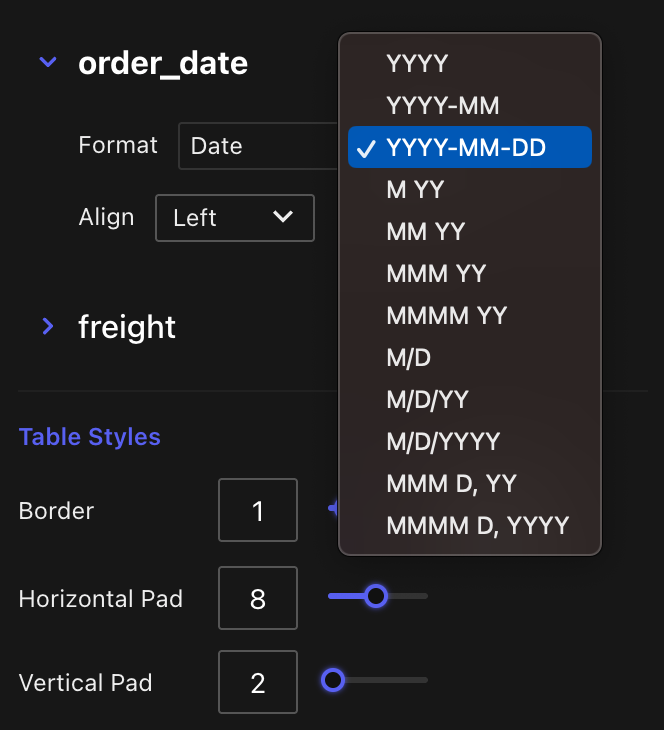
Steps to Apply a Predefined Date Format:
- Access the Date Field Settings:
- Navigate to the settings of the date field you wish to format
- Select the Desired Format:
- In the "Date Format" dropdown menu, choose from the available predefined formats.
By selecting one of these formats, Tractorscope will automatically apply the chosen format to your date field, ensuring consistency and saving you time.
Example of Predefined Date Formats
Here are some examples of the predefined date formats available in Tractorscope:
| Format Option | Example Output |
|---|---|
DD/MM/YY | 31/12/14 |
MM/DD/YY | 12/31/14 |
YYYY-MM-DD | 2014-12-31 |
MMM DD, YYYY | Dec 31, 2014 |