Chart field mapping connects SQL query results to the visual parts of a chart.
Query columns become fields
When a chart query runs, Tractorscope reads the returned columns. Those columns can be used as axes, labels, values, series, table columns, map coordinates, or tooltip data depending on chart type.
Each returned column appears under Fields with the roles the current chart type accepts. Here a query returning
category
and revenue
maps the first to the x axis and the second to the value: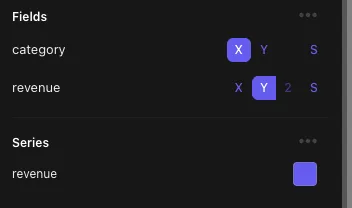
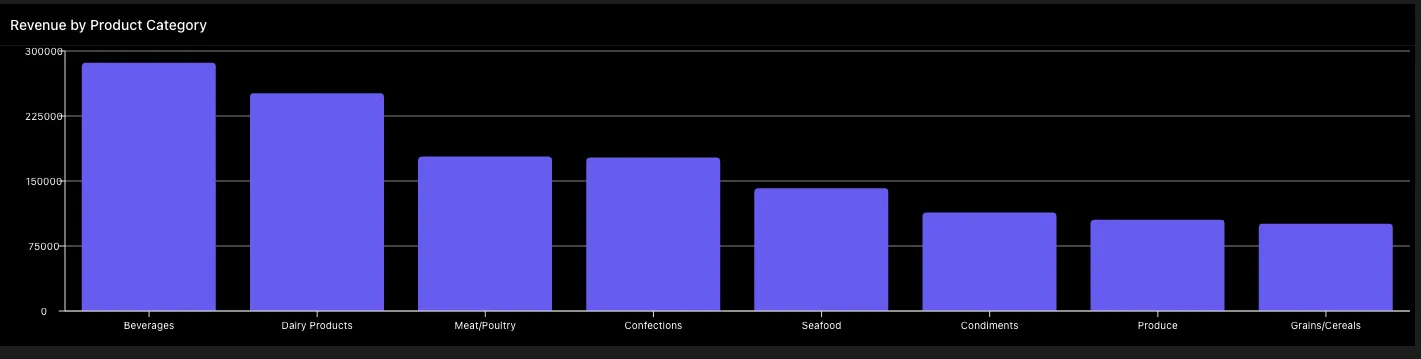
Layers and series
Some chart types use layers and series to define how values are rendered. A series might represent a metric, category, or grouped value.
Good field names
Use SQL aliases to make field names readable:
select
  date(created_at) as order_date,
  count(*) as order_count
from orders
group by 1
select
date(created_at) as order_date,
count(*) as order_count
from orders
group by 1Readable aliases make chart settings easier to configure and maintain.
Tips
- Return the minimum fields needed.
- Use numeric columns for values.
- Use date or category columns for grouping.
- Use clear aliases for table headers and chart labels.